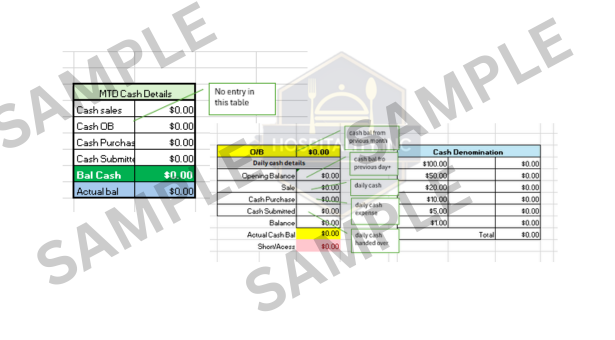
Daily Sales Summary Excel Template for Restaurants (Cash, Card & MTD Tracking)

Managing daily sales in a restaurant is not just about knowing total revenue. With multiple payment modes like cash, credit cards, and online delivery platforms, poor tracking can easily lead to cash mismatch, reporting errors, and revenue leakage.

This Daily Sales Summary Excel Template for Restaurants is designed to help restaurant owners, managers, and chefs record daily sales accurately and view clear Month-to-Date (MTD) summaries in one simple sheet.

Why Daily Sales Tracking Is Important for Restaurants

Many restaurants rely on:

  • POS reports only
  • Manual registers
  • End-of-day WhatsApp numbers
  • This often leads to:

❌ Cash mismatch
❌ Missed online sales
❌ Wrong month-end figures
❌ No clear MTD (Month-to-Date) view

A simple, structured daily sales summary can eliminate these issues completely.

What This Daily Sales Summary Excel Template Does

This Excel tool allows you to record and track daily sales for the entire month in one place.

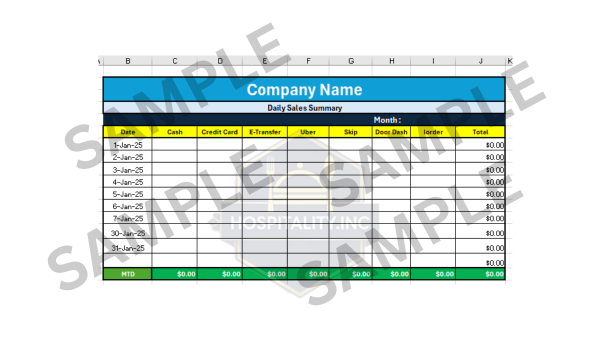
✔ Track Sales by Payment Mode

You can record daily sales for:

  • Cash

  • Credit Card

  • E-Transfer

  • Uber

  • Skip

  • DoorDash

  • Other Orders

Everything is visible at a glance.

✔ Automatic Daily Total

Once you enter the values, the daily total is

calculated automatically, reducing manual

calculation errors.

✔ Month-to-Date (MTD) Summary

At the bottom of the sheet,

the template automatically shows:

  • MTD Cash

  • MTD Card

  • MTD Online Aggregators

  • Total Month Sales

This is extremely useful for:

  • Owners

  • Account teams

  • Monthly review meetings

✔ Simple & Easy to Use

  • No advanced Excel knowledge required

  • Just enter numbers in the highlighted fields

  • Works on Windows & Mac

Ideal for:

  • Restaurant owners

  • Chefs

  • Managers

  • Accountants

✔ Track Restaurant Sales by Payment Mode

✔ Automatic Daily Total Calculation

✔ Month-to-Date (MTD) Sales Summary

✔ Simple, Easy & Practical for Daily Use

Who Should Use This Daily Sales Excel Template?

This Daily Sales Summary Excel is perfect for:

  • Single outlet restaurants

  • Multi-outlet operations (one file per outlet)

  • Cafés & bakeries

  • Cloud kitchens

  • Takeaway & delivery-focused brands

If you want clarity, control, and clean reporting, this tool is for you.

Sample Preview of the Daily Sales Summary Excel

Daily sales summary excel template for restaurants with MTD tracking

The preview image is watermarked. The purchased Excel file is fully editable with protected formulas.

How This Excel Helps in Real Restaurant Operations

Using this template daily helps you:

  • Control cash handling

  • Match POS vs actual collections

  • Prepare accurate monthly reports

  • Save time during audits

  • Improve financial discipline

Small daily discipline = big monthly clarity.

This makes monthly reporting and cash control easier and more reliable for restaurant businesses.

Download the Daily Sales Summary Excel Template

This is a ready-to-use Excel file with:

  • Editable input fields

  • Locked formulas for safety

  • Clean, professional layou

  • Licensed for use by one restaurant outlet

  • Not for resale or redistribution

License & Usage

This template is created from real restaurant operations experience, not theory.
If you want simple tools that actually work on the ground, this is a great place to start.

More restaurant management Excel tools coming soon under Hospitality Inc.

“Looking for Food Cost, Inventory, or Recipe Costing Excel tools? Stay connected.” or check out my other blog here 

1 thought on “Daily Sales Summary Excel Template for Restaurants (Cash, Card & MTD Tracking)”
  1. Pingback: Why Hardworking Restaurant Owners Still Don’t Grow - Hospitality Support

Leave a Comment

Your email address will not be published. Required fields are marked *

Scroll to Top